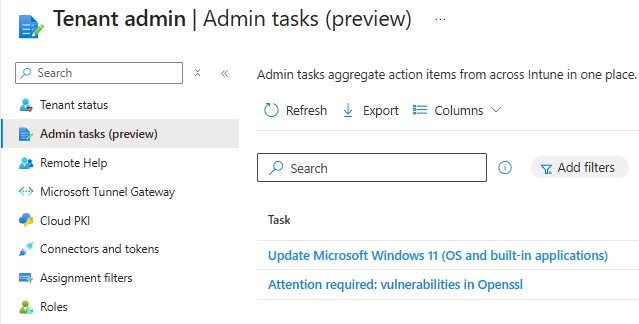
Admin Tasks reached general availability in January 2026. It does not add new capabilities, it unifies the operational workflows for Endpoint Privilege Management (EPM), Defender, and Multi Admin Approval into a single node under the Tenant Administration > Admin tasks node, with search, filtering, and sorting across all of them.
What Gets Consolidated
The Admin tasks node supports EPM file elevation requests, Microsoft Defender security tasks, Multi Admin Approval (MAA) requests, and Device Offboarding tasks.
The original locations still exist and still work. Selecting a task opens the same interface and workflow as the source location, nothing changes about how you act on a task, only where you find it.
RBAC and Scope Tags: Read This Before Enabling
To access the admin tasks pane you need the Organization > Read permission. Your assigned roles determine which tasks you can see and manage, you can only see tasks permitted by your assigned roles within each task’s original source node.
Alongside the GA release, EPM scope tag enforcement was tightened: administrators can now view and manage only the elevation requests for devices and users that fall within their assigned scope. If scope tags were configured loosely during EPM piloting, audit them before pointing helpdesk staff at this node. Requests outside an admin’s scope will not appear with no indication they exist.
One Task Type You May Not See
A fourth task type is in public preview and requires Microsoft Security Copilot, included for Microsoft 365 E5 customers. The Device Offboarding Agent detects unused or outdated devices using automated signals across Intune and Microsoft Entra, and provides actionable recommendations requiring approval before offboarding. Without the correct license, this task type will not appear. EPM, Defender, and MAA carry no additional licensing requirement.
Conclusion
The value is proportional to how actively EPM and MAA are in use. For environments where a helpdesk team handles elevation requests daily, having a single queue rather than three separate navigation paths is a genuine operational improvement. This is something to keep in mind when reviewing how your team handles EPM approvals day to day.