Until the February 2026 service release , assignment filters for managed apps could only distinguish between a broad “Managed” or “Unmanaged” state. Microsoft has now expanded the Device Management Type property to reflect how a device was actually enrolled, with separate values for each enrollment type on both Android and iOS/iPadOS. The full details are on Microsoft Learn: What’s new in Microsoft Intune. The rollout is gradual, with full availability expected by late March 2026.
What Microsoft Announced
Assignment filters in Intune allow you to target app assignments to specific subsets of devices based on rules. The Device Management Type property is one of the available filter conditions, and until now it offered a limited distinction between managed and unmanaged states.
With this update, the property becomes significantly more precise.
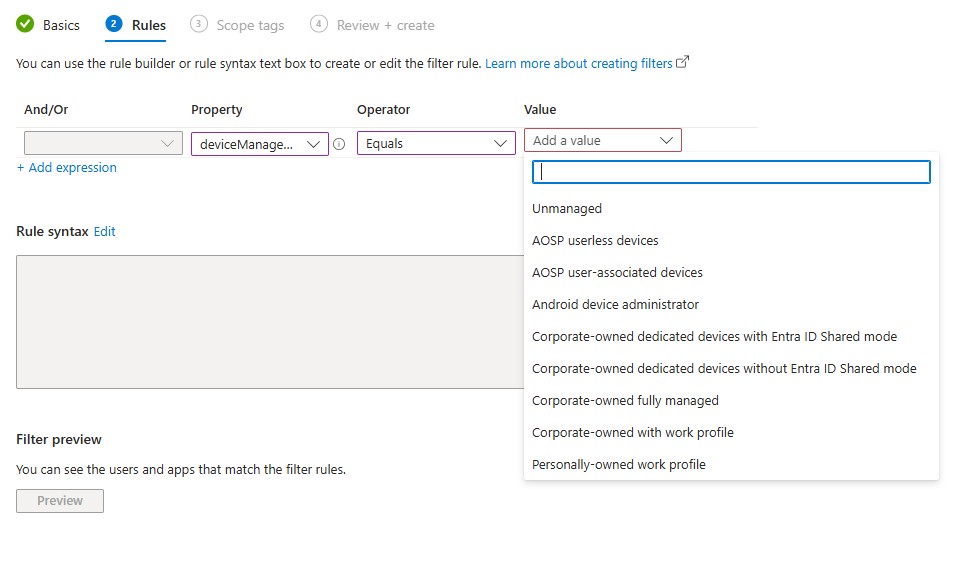
For Android, the following options are added:
- Corporate-owned with work profile
- Corporate-owned fully managed
- Corporate-owned dedicated devices without Entra ID Shared mode
- Corporate-owned dedicated devices with Entra ID Shared mode
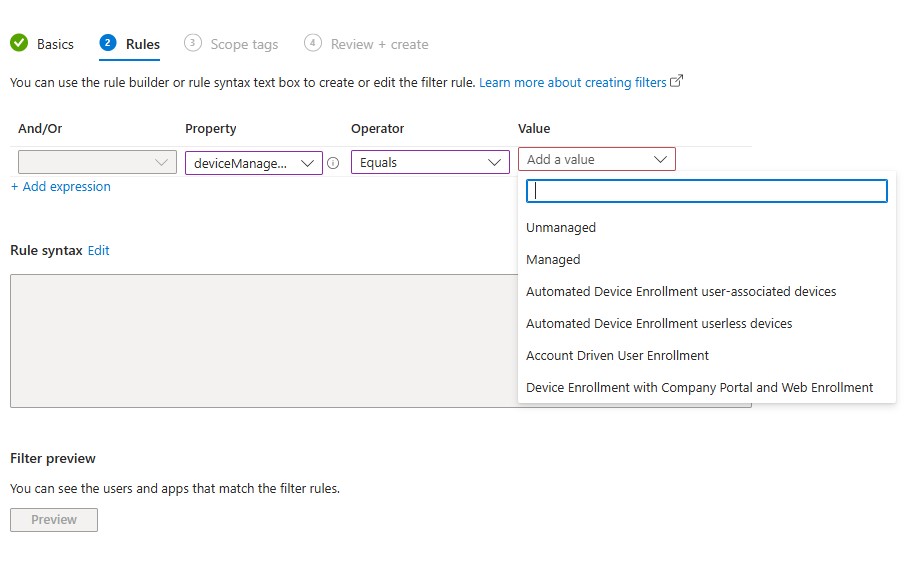
For iOS/iPadOS, the new options are:
- Automated Device Enrollment user-associated devices
- Automated Device Enrollment userless devices
- Account Driven User Enrollment
- Device Enrollment with Company Portal and Web Enrollment
The new values are already visible in production tenants. The screenshots below show the deviceManagementType property in a Managed apps filter, for Android and iOS/iPadOS respectively.
Android values
iOS/iPadOS values
What It Means in Practice
The practical value here is targeting precision. In a mixed fleet, where some devices are ADE-enrolled, some are BYOD enrolled via Company Portal, and some are MAM-only, a single app assignment filter previously could not distinguish between, for example, an Automated Device Enrollment (ADE) supervised device and one enrolled manually through the web. You were applying the same policy surface to devices with meaningfully different management profiles.
With these new filter options, you can assign app configuration policies, app protection policies, or app assignments to a precise enrollment type. An app configuration tailored for supervised ADE devices does not need to reach a device enrolled through Company Portal.
Important Details to Note
The first thing worth paying attention to is the legacy value behaviour. On iOS/iPadOS, the old “Managed” value remains present alongside the new granular ones, it has not been replaced.
The same pattern applies on Android. Filters that were built on the legacy broad value continue to work, but they now match a wider range of enrollment types than they did before. An existing filter using “Managed” on iOS will match ADE devices, Company Portal enrollments, and Account Driven User Enrollment indiscriminately. That may or may not be the intended behaviour depending on how those filters were originally designed.
The second important detail is the Entra Device ID dependency. Microsoft states that for the automatic mapping of legacy filter values to the new granular types to work correctly, devices must be registered with Microsoft Entra and must have a Microsoft Entra Device ID. If enrolled devices do not meet that requirement, the filter will not match to the more granular management types.
If you need to force Entra device registration for MAM-managed apps, Microsoft provides an app configuration policy key: com.microsoft.intune.mam.IntuneMAMOnly.RequireAADRegistration=Enabled. This can be deployed as an app configuration policy to ensure MAM-only devices register with Entra and receive a Device ID, which is the prerequisite for the filters to work correctly.
Conclusion
The expanded Device Management Type property brings a level of targeting precision that was previously missing from managed app assignment filters. The two details that deserve attention before relying on this in production are the legacy “Managed” value which remains and now covers more enrollment types than before and the Entra Device ID dependency, which will affect environments where MAM-only devices have never been required to register with Entra.
It is worth reviewing your existing filter rules before assuming the automatic mapping produces the targeting behaviour you expect.
This is something to keep in mind when planning or auditing your assignment filter structure, especially in deployments where Android and iOS enrollment types are mixed.