The public preview of Microsoft Entra Backup and Recovery, which landed in March 2026, raised an obvious question that I have not seen properly addressed anywhere. Microsoft already has a backup product. It is called Microsoft 365 Backup, it has been generally available since the summer of 2024, and it already has the concept of backup policies, restore points, tenant-level scope, and a dedicated administrator role. If Microsoft wanted to protect Entra ID objects, the natural thing to do would be to add a fourth workload to Microsoft 365 Backup. That is not what happened.
Instead, Entra Backup and Recovery shipped as a completely separate product. Different admin centre, different roles (Entra Backup Administrator and Entra Backup Reader), different retention model (five days, one snapshot a day), different licensing requirement (Entra ID P1 or P2), and a different documentation tree. The Entra Backup and Recovery overview does not reference Microsoft 365 Backup at all. That is a deliberate architectural choice, and it says something important about how Microsoft actually positions Microsoft 365 Backup close to two years into its lifecycle.
This post is the answer to that question, and it is not the answer I expected to arrive at when Microsoft 365 Backup first went GA.
What was expected at launch
It is worth remembering the framing at GA, because the gap between expectation and reality is the whole point. Microsoft 365 Backup was launched as a first-party, high-speed, tenant-integrated backup service, alongside an API (Microsoft 365 Backup Storage) that the established backup vendors had already agreed to adopt. A reasonable assumption at the time was that the three-workload scope (Exchange, OneDrive, SharePoint) was just the starting point. Teams messages would follow. Entra ID would follow. Groups, Planner, and the rest of the suite would come in over time. The product would grow into the backup role that other third-party solutions had held for a decade, and the Backup Storage API was the concession to partners who wanted to add value on top.
That is not what is happening. The Entra preview makes it clear.
What Microsoft 365 Backup actually is today
Before explaining why the Entra team did not ship inside Microsoft 365 Backup, it is worth being precise about what Microsoft 365 Backup actually covers today.
It is a pay-as-you-go service, billed at $0.15 per GB per month of protected content, that covers three workloads:
- Exchange Online mailboxes
- OneDrive for Business accounts
- SharePoint Online sites
It is operated from the Microsoft 365 admin center, configured through backup policies, and retains restore points for up to 365 days. The recovery point objective is 10 minutes for the first 14 days, then weekly for the remainder of the year for OneDrive and SharePoint, and 10 minutes for the full year for Exchange Online. Restores can be run in place or to a new URL, with “Express mode” offered as a faster option for SharePoint and OneDrive. Granular file and folder restore for SharePoint and OneDrive, the single biggest missing feature at launch, has reached general availability with the rollout completing between late April and early May 2026.
Partners can build on top of the service through the Backup Storage API, which stores partner-managed backups inside the same high-speed fabric.
That is the product. Three workloads, 365-day retention, in-tenant storage, fast restore. Nothing else.
Why Entra did not ship inside it
The architectural story becomes clearer once you list what Microsoft 365 Backup does not do.
- It does not store backups outside the tenant. All backup data lives inside the same tenant and the same control plane as the production data.
- It does not offer immutability. There is no equivalent to the immutable object-storage tier that a properly designed third-party backup uses.
- It does not offer export. No PST, no MSG, no offline copy, no cross-tenant restore.
- It does not back up Teams chat or channel messages. The workloads behind Teams are covered transitively, but the messages themselves are not.
- It actively discourages restore testing. The documentation caps test restores at twice a month per protection unit.
- It does not cover Microsoft 365 Groups, Planner, Loop, Stream, or Viva Engage as first-class objects.
- Billing on protected GB adds up quickly at scale. The Microsoft 365 Backup pricing calculator is the right place to start, but the numbers tend to surprise.
Now look at what Entra Backup and Recovery actually does. It takes a daily snapshot. It retains five days of history. It covers users, groups, applications, service principals, Conditional Access policies, authentication method policy, authorization policy, and named locations. Objects synced from on-premises Active Directory are visible in the snapshots but cannot be recovered through the feature. It requires Entra ID P1 or P2.
There is almost no technical overlap between the two products. Microsoft 365 Backup is a content backup product, operating on large mutable data stores, billed by the gigabyte, optimised for fast restore of entire sites or mailboxes. Entra Backup and Recovery is a configuration backup product, operating on a small directory, billed through existing Entra licensing, optimised for “what did we change, and can we roll it back”. Merging them would have forced one set of assumptions onto the other, and neither set works for the opposite job.
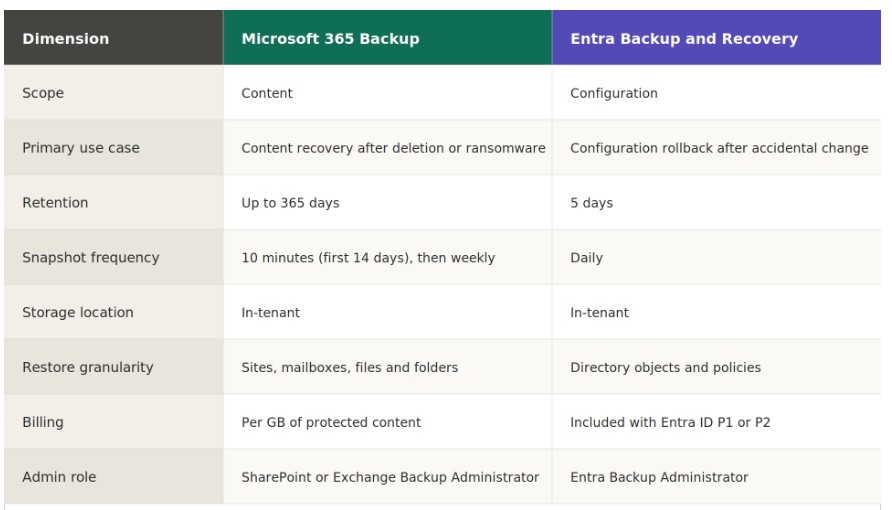
That by itself would explain a separate product. But it is not the whole answer.
The deeper reason is that Microsoft 365 Backup has not been designed as the place where the full backup story for Microsoft 365 gets told. The Backup Storage API makes this explicit: the design assumption is that third-party partners will handle the breadth (Teams messages, Entra objects, cross-tenant restore, export, immutability, long-term retention) while Microsoft 365 Backup handles the speed. If that is the design, there is no strategic reason to put Entra inside Microsoft 365 Backup, because Entra protection is the partners’ job. Shipping Entra Backup and Recovery as a separate, deliberately narrow preview fits the same pattern. Microsoft is protecting the most common accidental-change scenarios in the admin centre itself, and leaving the heavy lifting to the ecosystem.
The scenario test
If the above is right, the scenario test for Microsoft 365 Backup should produce the same verdict across tenant profiles: good as an operational recovery layer, not good enough to replace an incumbent backup product. That is exactly what happens in practice.
- Regulated tenant with out-of-tenant copy requirements. Fails immediately. The backup lives in the tenant.
- Tenant where Teams is a system of record. Fails. No Teams messages.
- Tenant with identity-heavy custom configuration (Conditional Access, app registrations, B2B). Fails. Entra Backup and Recovery is a separate, preview-stage feature with a five-day window.
- Small tenant with low compliance burden. Works, but also does not need a full backup product in the first place. Purview retention plus versioning is often enough.
- Medium tenant, mixed workload, long retention needs. Partial. Exchange, OneDrive, and SharePoint are covered for a year, but Teams messages and Entra are gaps.
- Tenant that wants fast operational restore on top of an existing third-party backup. This is where Microsoft 365 Backup shines, and where the Backup Storage API earns its place.
There is no tenant profile on that list where Microsoft 365 Backup, on its own, replaces an incumbent Commvault, Veeam, or AvePoint deployment. Close to two years after GA, that scenario still does not exist. The product competes for the “fast undo” layer inside the tenant, not for the backup role itself.
Conclusion
At launch, Microsoft 365 Backup had the shape of a product that could reshape the Microsoft 365 data protection market. Microsoft had the platform advantage, the API story, and the partner goodwill to make it happen. The Entra Backup and Recovery preview is the clearest signal yet that it is not going to. If Microsoft 365 Backup were growing into a full backup product, Entra would have shipped inside it. It did not, because Microsoft 365 Backup is not that product and is not intended to become it.
That reframes the whole evaluation. Microsoft 365 Backup should be understood as what its architecture describes and what the Entra decision confirms: a tenant-integrated rapid-recovery layer, useful on its own for a narrow set of tenants, and useful for everyone else as an accelerator for an existing backup product through the Backup Storage API.
If you are renewing a Veeam, AvePoint, or Commvault contract right now, there is no scenario I would use to argue for retirement. The third-party product still does things Microsoft 365 Backup does not do, and the design of Backup Storage, reinforced by the design of Entra Backup and Recovery, suggests Microsoft expects that to remain true.
This is something to keep in mind next time the “Microsoft has built its own backup now” conversation comes up. It has, but not in the shape most people assumed, and the Entra preview is the most honest indicator we have had so far that the shape is not going to change.
I hope this helps.